
Git Hub Page: https://github.com/zipzav/UE4-UI-Widgets
I wanted to try and make a node spell casting system. Think UE4 blueprints but with magic spells. To implement this, I needed a UI element that would allow me to select what type of action the spell was (Melee Attack, Ranged Attack, Shield). In UMG, there is already the ComboBoxString, but that’s not very visually interesting.
I wanted to be able to select from different icons representing the type of actions, to support this I made a simple Image ComboBox that displayed images instead of strings. This image will return the index of the selection which works well with using C++'s enum class. You can request the index or bind to an OnSelectionChanged event.
UMG Widget Structure
Widget
   Canvas Panel
      VerticalSelectionBox ( UVertical Box )
         SelectionButton ( UButton )
            [dynamically added UImage]
         SelectionScrollBox ( UScrollBox )
            [dynamically added Custom IndexedButtons]
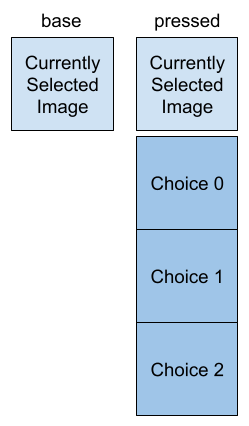
This widget will need a button (SelectionButton) that shows the currently selected image, then when pressed will show a dropdown menu(SelectionScrollBox) of the possible selections.
VerticalSelectionBox
When the SelectionButton is pressed, we want to show the different options possible. Using Unreal’s VerticalSelectionBox UMG Widget, we can insert Buttons that show the options, and
the necessary formatting will be automatically done for us.
Custom IndexedButton
In the vertical box, we will be placing as many buttons as there are choices. This means we need a way to identify which of the buttons is pressed. There are the different OnClick/Press etc delegates that we can bind to, but there is one problem, how do we identify which button was pressed? The base implementation of the UMG Button doesn’t really have a neat way of doing this. That’s fine. We’ll create a derived class from Button and add some sort of identifying functionality.
A simple way to identify which button was pressed? Well, let’s just add an index member to our derived class, that we can set during initialization, and just return that when the button is pressed.
Ok, first- the index. We want a way to set it, and get it if needed. Easy enough:
public:
	UFUNCTION()
	int GetButtonIndex() const { return buttonIndex; }

	UFUNCTION()
	void SetButtonIndex( int index ) { buttonIndex = index; }
private:
    int buttonIndex;
The original delegate assigned to the OnClicked event, does not take in a parameter. So we create a new one with a single parameter: our newly minted index:
DECLARE_DELEGATE_OneParam( FOnImageSelectionClicked, int )

...

public:
	FOnImageSelectionClicked OnClikedIndexed;
TSharedRef<SWidget> UMIndexedButton::RebuildWidget()
{
	MyButton = SNew( SButton )
		.OnClicked( BIND_UOBJECT_DELEGATE( FOnClicked, IndexedButtonHandledClick ) );

		...

}

FReply UMIndexedButton::IndexedButtonHandledClick()
{
	OnClikedIndexed.ExecuteIfBound( buttonIndex );
	return FReply::Handled();
}
This way, in our ImageSelectionWidget we can set the index of each button, then bind to the OnClicked event, so we receive back the index when the button is pressed.
Input: UImage Array
One of the necessary inputs are the images to displayed to represent the selections. We expose in the editor of course:
private:
   UPROPERTY( EditAnywhere, Category = "Selector Inputs" )
   TArray<UTexture2D*> imageSelections;
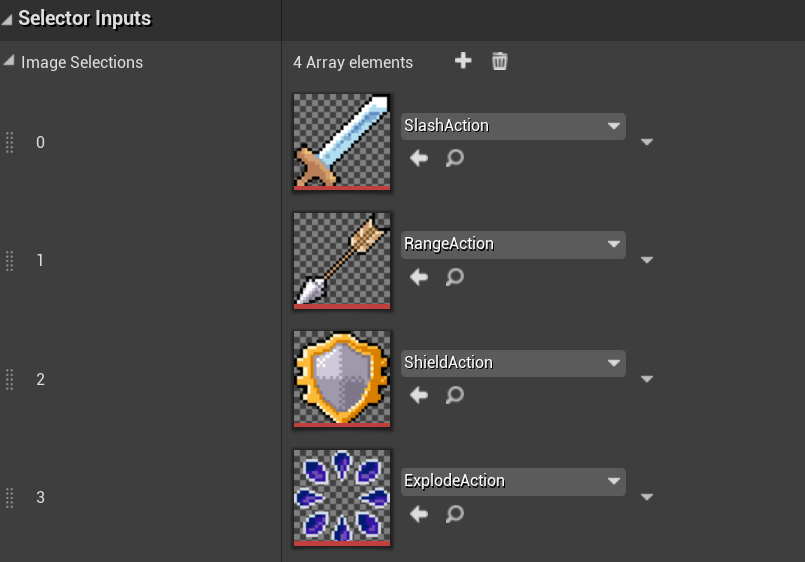
Image SelectionBox Widget
We’ll want to bind a OnImageSelectionOptionClicked( int index ) function to each of the button’s OnClicked delegate. And OnImageSelectionOptionClicked will change the image displayed by the button, and change the widget’s record of the index of the current selection:
void UMImageSelectorBoxWidget::NativeOnInitialized()
{
...
	for( const auto& image : imageSelections )
	{
		int index = selectionOptionsButton.Add( NewObject<UMIndexedButton>( this ) );

		UImage* selectionImage = NewObject<UImage>( this );
		selectionImage->SetBrushFromTexture( image );
		selectionImage->SetBrushSize( widgetSize );

		selectionOptionsButton[index]->AddChild( selectionImage );
		selectionOptionsButton[index]->SetBackgroundColor( FLinearColor( 0, 0, 0, 0 ) );
		selectionOptionsButton[index]->SetBackgroundColor( FLinearColor( 0, 0, 0, 0 ) );
		selectionOptionsButton[index]->SetButtonIndex( index );
		selectionOptionsButton[index]->OnClikedIndexed.BindUFunction( this, "OnImageSelectionOptionClicked" );

		selectionScrollBox->AddChild( selectionOptionsButton[index] );
	}
...
}


void UMImageSelectorBoxWidget::OnImageSelectionOptionClicked( int clickedIndex )
{
	SetCurrentSelectionIndex( clickedIndex );
	CloseSelectionBox();
	static_cast<UImage*>( selectionButton->GetChildAt( 0 ) )->SetBrushFromTexture( imageSelections[clickedIndex] );
}


